
AI Is Not A Great Coder
Every week I hear a new AI podcast or read an article about AI that claims “artificial intelligence has conquered the coding problem”. The claim that is being made, is that for all intents and purposes – AI has nailed writing code. It is so good at writing code that it often needs little or no supervision. Companies have seen results that warrant laying off software engineers. The few software coders that remain often consider themselves top level “vibe coders”.
As a software engineer with over 4 decades of experience that has spanned the entire range from assembly and machine code all the way through to the latest full stack web apps, mobile apps, and micro services architectures, I have my doubts. While I have seen AI create services and applications that do function, good lord is it a pile of garbage underneath it all. While AI can eventually come up with a functional app , good luck with long term maintenance. And performance? That art has been long forgotten with the final nail in that coffin coming during the “great offshoring” and commodity software engineering taking hold over the past decade. While there are a handful of commodity offshore coding houses that know how to write efficient and stable applications, most of the code generated in the past decade is complete garbage of the “just get the job done” variety. Underneath it is complete crap that consumes 3x the storage space, eats up 5x as much memory and 10x more compute power than is needed. Sadly, that code accounts for 90% of what is out there in public code repos — the same repos AI agents have been trained on over the past few years.
The result of all this are AI agents that can write code, even build fully functional applications but in the end are the most inefficient piles of garbage code you can imagine. Documentation of the code, sparse at best and often inaccurate. The myriad of over-bloated function stacks is crazy. The loss of consistency with best practices and SOPs being stomped over at every turn. AI as a coding agent is basically a giant “loop over this task, throw as much shit against the wall as possible, and see what sticks”. As soon as a mini code-verify-recode loop passes the verification test , the task is considered complete and the AI moves on. The unit and smoke tests are shallow. Code quality, best practices and SOP validation is completely left by the wayside. The end result is code that works but is garbage.
As many AI-centric application development teams are finding out – the resulting code is impossible to maintain or figure out by humans after just a few iterations under full AI control. If the AI cannot figure out what is wrong, good luck with getting back on track. Entire projects have been scrapped in favor of complete rewrites after teams realize nobody, not even the AI that wrote it, knows how anything works.
While most of my insight into this issue is via anecdotal evidence from various news articles and AI posts about artificial intelligence and software engineering, my own experiences show that AI is at best a mid-level coder. AI is NEVER a great coder, and ALWAYS throws convention and design patterns by the wayside. The AI focuses on one thing – meeting the specification it distilled from your prompt input with zero regard on how to get there. Unless you are loading up your AI software engineer with a mile long list of markdown files that contain every design detail, best practices, and an explicit architecture specification, your AI Software Agent is going to piss all over years of convention and SOPs when it produces your solution.
Real World Coding Example – A Shell Script Revision
In my most recent of many real-world examples, I interact with an AI agent running the latest OpenAI Codex on GPT 5.4 (or 5.5 these days). The Codex is run via an agent that is pre-loaded with a complete design specification including architecture documents, code style, and best practices that have been honed over months of AI interactions explicitly tied to software engineering tasks. Even with a stack of hints provided in the session context, the results often meet the task objective but leave behind a mess of inconsistencies, lack of documentation, and over time devolve into a giant bowl of code spaghetti (all hail the mighty Flying Spaghetti Monster... AI is clearly a practicing Pastafarian).
In my simple real-world example, I have a basic shell script that assists with running OpenClaw in a Docker container as an ACP router. While the details may not make much sense, the bottom line is that I have a set of commands that run an application on my laptop. These commands are written in one of the most ubiquitous and simplest “coding” languages available – the humble bash script. Not overly complex and with millions of script examples, something AI should be extremely well versed at.
The task was simple, the original script was running a Docker container that ran the openclaw CLI app within. The problem is that every time I would interact with this openclaw Docker app the shell script kills the old container and starts a new one with the same name. That is akin to starting a document in Word and every time you click away, to research something online for example (or with ChatGPT these days), and come back you close the Word app and re-open it before continuing your writing.
Using the same AI agent and ongoing context (a long running prompt interaction) that setup the Docker openclaw shell script in the first place, I explained the problem. The AI agent was to modify the script to do two things: 1) If the openclaw docker app is already running do NOT kill it and restart it, simply route the incoming request to the existing running app. 2) If the app is not running but a local lock file exists, remove the lock file THEN start the openclaw Docker app.
This should be a simple task, especially for the AI agent that set the entire thing up. This AI agent knows about the existing environment file, a file of variable names and values, the purpose of the Docker container, the language used to write the script, and where all the files and directories are related to this task. The process is already working, it is just not as efficient as it can be (again, thanks to the AI for originally providing A solution just not the BEST solution — AI is wonderful at wasting compute resources). Hopefully this request to improve on its work should be quick and easy.
The result – ok, but subpar. Here is what the revised script looks like:
#!/usr/bin/env bash
set -euo pipefail

SCRIPT_DIR="$(cd "$(dirname "${BASH_SOURCE[0]}")" && pwd)"
LOCK_FILE="$SCRIPT_DIR/openclaw-acp-sprocket/acp/event-ledger.json.lock"

if [ -f "$SCRIPT_DIR/local.env" ]; then
  # set -a (allexport) causes all variables defined from this point to be exported
  set -a
  source "$SCRIPT_DIR/local.env"
  set +a
fi

export OPENCLAW_IMAGE

# Assumes git clone https://github.com/openclaw/openclaw.git created a sibling openclaw directory to this script
cd "$SCRIPT_DIR/openclaw"

cleanup_lock() {
  rm -f "$LOCK_FILE"
}

compose_args=(
  -f ./docker-compose.yml
  -f ../Docker/Composers/openclaw_cli_override.yml
)

expected_cmd=(
  acp
  --url "wss://$SPARK_TS_HOST"
  --verbose
  "$@"
)
expected_cmd_signature="$(printf '%q ' "${expected_cmd[@]}")"

container_is_running() {
  local state
  state="$(docker inspect --format '{{.State.Running}}' "$OPENCLAW_ACP_CONTAINER_NAME" 2>/dev/null || true)"
  [ "$state" = "true" ]
}

running_cmd_signature() {
  docker inspect --format '{{range .Config.Cmd}}{{printf "%q " .}}{{end}}' "$OPENCLAW_ACP_CONTAINER_NAME" 2>/dev/null || true
}

if container_is_running; then
  current_cmd_signature="$(running_cmd_signature)"

  if [ "$current_cmd_signature" = "$expected_cmd_signature" ]; then
    echo "Attaching to running Docker container $OPENCLAW_ACP_CONTAINER_NAME" >&2
    exec docker attach "$OPENCLAW_ACP_CONTAINER_NAME"
  fi

  echo "Replacing running Docker container $OPENCLAW_ACP_CONTAINER_NAME to apply updated ACP arguments" >&2
  docker rm -f "$OPENCLAW_ACP_CONTAINER_NAME" > /dev/null 2>&1 || true
fi

cleanup_lock
trap cleanup_lock EXIT INT TERM

echo "Loading OpenClaw image $OPENCLAW_IMAGE into Docker container $OPENCLAW_ACP_CONTAINER_NAME" >&2

docker compose "${compose_args[@]}" \
  run --name "$OPENCLAW_ACP_CONTAINER_NAME" --rm --no-deps \
  -T \
  -e OPENCLAW_GATEWAY_TOKEN="$SPARK_TOKEN" \
  openclaw-cli \
  "${expected_cmd[@]}"

exit $?
Does this script run? Yes.
Does it to what was asked? Sort of. It does what was asked MOST of the time.
But the problem here is not whether or not it works. That view is too simplistic. As a software engineer we should always strive to not only provide a solution but to not create a well-crafted solution. That is the crux of the problem. AI writes codes. It does NOT write well-crafted solutions. What do I mean by that?
The LOCK_FILE Definition Problem
The first issue in this example is inconsistency. Consistency creates repeatable patterns. Patterns tend to lead toward solutions that are not brittle. The more you diverge from the patterns the more brittle the code. Here, the AI agent decided it was best to create a variable to track the name of the lock file we need to look for and remove in certain cases. As such it created this very common bash script pattern:
LOCK_FILE="$SCRIPT_DIR/openclaw-acp-sprocket/acp/event-ledger.json.lock"That in-and-of itself is not a bad idea. In fact it is very common and acceptable in most cases.
However, here it breaks the “use an environment file to define environment variables” pattern we’ve already defined. Not only did we define this pattern previous, it was designed in the very same AI context. Yet the fastest path to a solution here was to ignore the pre-defined pattern and create an inline declaration of this variable. That means the updated script breaks design patterns and code style for this implementation. It also means that if any other support scripts or pieces of this application stack need to work with the same lock file there is no shared resource to identify the file. If we had AI write another script dealing with the lock file it would do the same thing, create an inline variable. What happens when we change the name of the lock file? We’d be editing TWO scripts doubling the changes of introducing errors, missing a reference — in other words we just made our application twice as brittle.
The proper solution? Add this line to the existing local.env file that you already know about and have direct access to. That is the CORRECT solution for a well-crafted script that follows pre-existing patterns. It also follows the architecture and design pattern that was created earlier in the session.
The second issue with this variable is that it does not follow the predefined variable naming pattern. This is the pattern used for all other variables related to this openclaw and ACP instance in docker:
OPENCLAW_IMAGE="ghcr.io/openclaw/openclaw:2026.5.18-slim"
OPENCLAW_CONFIG_DIR="$SCRIPT_DIR/openclaw-acp-sprocket"
OPENCLAW_WORKSPACE_DIR="$SCRIPT_DIR/openclaw-acp-sprocket/workspace"
OPENCLAW_ACP_CONTAINER_NAME="openclaw.acp"
Instead of following pre-defined naming conventions, the AI agent created a semi-descriptive variable named “LOCK_FILE”. The problem here is that using generic variable names like that significantly increases the chance of a naming collision. As this app and support scripts grow there are higher changes on each turn that a new service will also have a lock file that needs management. It is not long before future coders are asking “is the openclaw lock file named LOCK_FILE? Or was that for the new abacus service? Or was that LOCKFILE?”. Explicit naming helps reduce pollution and cross-talk between application services. Not too mention we already had a pre-defined nomenclature that decided all variables specific to this service would start with the name OPENCLAW_. The AI completely disregarded this pattern and broke the design specification.
The proper implementation would have been to define this lock file name by adding this to the local.env file instead of an inline variable:
OPENCLAW_ACP_LOCK_FILE=”$SCRIPT_DIR/openclaw-acp-sprocket/acp/event-ledger.json.lock”
Lastly, is the use of a variable here even necessary? That can be argued two ways. In our current environment with our current set of scripts we only reference this file name in ONE PLACE, ONE TIME, and it is within this revised docker container management script. One would argue that using a variable here is inefficient. In fact it is far less efficient that doing a straight inline hard-coded file name. Yes, it makes maintenance easier if you place all your variant data (and file names can be highly variable) at the top of a script — but that also directly supports the “all variables in one place easy to edit” design of using a separate environment file. You can also argue that this pattern provides for future support of scripts as I noted previously, however I would normally opt for this to be an inline hard-coded value UNTIL I have a need to reference this a second time in a new script or service. At that point I would scan for references to the lock file and ensure any code references used a common service to determine the value – whether that be an environment file (like the current design) or via a Secrets or Variables cloud service.
This one line – three better options than what the AI agent produced.
Yes this example is extreme and in the end has little influence in the performance our results of how this service operates. However this is one small edit that ran one time on one script that is super short. Typical AI agents are making these same pattern-breaking non-performance-oriented decisions thousands of times in a row as they loop over-and-over on new or existing code. They are adding confusion and fragility to code at an astounding rate.
The Lack Of Documentation
As the saying goes, code should be self-documenting. In other words if your function and variable names are clear, few comments or added non-executable elements in the code are required. FEW comments. Not NO COMMENTS.
That is another problem with AI. While it knows what each thing is meant to do in its own mind, as any human knows, someone else is going to need to maintain this thing in the future. That means reading and understanding what is there. Not only understanding what was CREATED, but what the original INTENTION or goal was. I cannot understate how many times in my career I would be hunting a bug deep in an application I did not write and found a comment “This function does X” only to find in tracing the execution that in fact “The function DOES Y instead of X”. Knowing the intention or goal lead to a quick fix… “oh, this logic is inverse…” that lead to a quick fix.
Instead AI leans toward “no comments, I know what this is doing”. Maybe everyone thinks future AI agents will just understand code. The problem with that is if the first AI agent was sub-par and inverted the logic in error – every single downstream agent will assume that is correct and meant to be. Inevitably they will flail around for a solution assuming function inverted_logic() is correct. I cannot tell you how many times I’ve seen AI agents fixing other AI output and inevitably end up with something like this:
function inverted_logic() {
  return false;
}

function fixed_logic() {
   return INVERSE_OF( inverted_logic() );
}

function INVERSE_OF (x) {
    return ! x;
}

function fixed_output() {
   $output = fixed_logic();
   return $output;
}
And this is why commenting and documenting even simple code is important. AI sucks at that. In fact it skips doing so 90% of the time. That is not only horrible for future code maintenance, it also hurts the ability for mere humans to make sure the logic is correct and the app is going what they expect.
How would comments have helped?
// This function should ALWAYS return true
function inverted_logic() {
  return false;
}

// Output "true" when we run this
function fixed_output() {
   $output = fixed_logic();
   return $output;
}
If a human coder saw this they would hopefully read the comment and understand the fix is as simple as making our inverted_logic() function return true instead of false. Hopefully an AI would read the comment and understand the quicker fix versus having to take the careful route of “don’t change the inverted_logic function as we don’t know what it is supposed to be doing, and instead patch this safely by writing a new stack of inversion functions”. While this is an overly simplistic nonsense example, the premise stands. Commented code helps humans (and future AI agents) understand intention and purpose. That purpose may differ from the story the code may tell you.
What documentation is our script missing?
# If we already have a container named openclaw.acp running a bash true boolean
# otherwise returns a bash false
container_is_running() {
  local state
  state="$(docker inspect --format '{{.State.Running}}' "$OPENCLAW_ACP_CONTAINER_NAME" 2>/dev/null || true)"
  [ "$state" = "true" ]
}

# Returns the command running on the openclaw-cli service formatted as:
# "acp" "--url" "wss://digit-001.tail162009.ts.net" "--verbose"
running_cmd_signature() {
  docker inspect --format '{{range .Config.Cmd}}{{printf "%q " .}}{{end}}' "$OPENCLAW_ACP_CONTAINER_NAME" 2>/dev/null || true
}
However, even more important than commenting those two simple functions, is explaining what this code is meant to do:
if container_is_running; then
  current_cmd_signature="$(running_cmd_signature)"

  if [ "$current_cmd_signature" = "$expected_cmd_signature" ]; then
    echo "Attaching to running Docker container $OPENCLAW_ACP_CONTAINER_NAME" >&2
    exec docker attach "$OPENCLAW_ACP_CONTAINER_NAME"
  fi

  echo "Replacing running Docker container $OPENCLAW_ACP_CONTAINER_NAME to apply updated ACP arguments" >&2
  docker rm -f "$OPENCLAW_ACP_CONTAINER_NAME" > /dev/null 2>&1 || true
fi
Simply reading the code above, tell me what the INTENTION was if the container is already running. How I am reading this:
- Check to see if the openclaw.acp container is already running.
- If it IS running (the case noted above), then do the following:
- See if the container is running the same exact command we started with:
“acp” “–url” “wss://digit-001.tail162009.ts.net” “–verbose”
// I only know this thanks to having put it in my earlier comments on what we expect to see, AI left that out - If the command matches (it will), then ATTACH the running script environment to that existing applet in the container
- THEN REMOVE THE CONTAINER ALWAYS
- See if the container is running the same exact command we started with:
But , wait, the script IS NOT always removing the container. Here the script calls “exec”, which routes to a new script execution environment and effectively ends the current script execution on this line. Another reason comments are important. They not only describe intention, they also help educate others – human or artificial intelligence on what is going on.
Here is my human-revised script.
#!/usr/bin/env bash
set -euo pipefail

SCRIPT_DIR="$(cd "$(dirname "${BASH_SOURCE[0]}")" && pwd)"

# -- Critical environment variables reside in local.env
# set -a (allexport) causes all variables defined from this point to be exported
if [ -f "$SCRIPT_DIR/local.env" ]; then
  set -a
  source "$SCRIPT_DIR/local.env"
  set +a
fi

# -- script specific variables
compose_args=(
  -f ./docker-compose.yml
  -f ../Docker/Composers/openclaw_cli_override.yml
)
expected_cmd=(
  acp
  --url "wss://$SPARK_TS_HOST"
  --verbose
  "$@"
)
expected_cmd_signature="$(printf '%q ' "${expected_cmd[@]}")"

# -- Remove the lock file if left behind by a rogue openclaw ACP request
# This file is mounted from the host in the guest Docker container
cleanup_lock() {
  rm -f "$OPENCLAW_ACP_LOCK_FILE"
}

# -- Is the specified container (openclaw.acp) already running?
# returns boolean true if it is
container_is_running() {
  local state
  state="$(docker inspect --format '{{.State.Running}}' "$OPENCLAW_ACP_CONTAINER_NAME" 2>/dev/null || true)"
  [ "$state" = "true" ]
}

# -- Get the current command running on the openclaw CLI service in the Docker container
# Example: "acp" "--url" "wss://digit-001.tail162009.ts.net" "--verbose"
running_cmd_signature() {
  docker inspect --format '{{range .Config.Cmd}}{{printf "%q " .}}{{end}}' "$OPENCLAW_ACP_CONTAINER_NAME" 2>/dev/null || true
}

# Assumes git clone https://github.com/openclaw/openclaw.git created a sibling openclaw directory to this script
cd "$SCRIPT_DIR/openclaw"

# -- If the container is already running
# Check that the command signature (is it running the acp bridge to the same server?) matches what we want to run now...
# . If the command is the same, branch off into a new shell runtime and attach to the pre-running container, hand off processing
# . If NOT , remove the running container and continue in this script
if container_is_running; then
  current_cmd_signature="$(running_cmd_signature)"

  if [ "$current_cmd_signature" = "$expected_cmd_signature" ]; then
    echo "Attaching to running Docker container $OPENCLAW_ACP_CONTAINER_NAME" >&2
    exec docker attach "$OPENCLAW_ACP_CONTAINER_NAME"
  fi

  echo "Replacing running Docker container $OPENCLAW_ACP_CONTAINER_NAME to apply updated ACP arguments" >&2
  docker rm -f "$OPENCLAW_ACP_CONTAINER_NAME" > /dev/null 2>&1 || true
fi

# Remove any lock file left behind by a failed ACP request
# Trap ensures we do the same thing if the file is still there when this script exits gracefully (exit) or not (int, term)
cleanup_lock
trap cleanup_lock EXIT INT TERM

# Use Docker composer to spin up OpenClaw in a Docker container
# Run the openclaw CLI and execute the ACP command specified in expected_cmd noted at the top of the script
# The Docker container openclaw ACP acts as a bridge routing to our remote Spark server found on the Tailscale VPN
# The Spark server is running an OpenClaw gateway with a trained agent named "Sprocket" that knows Store Locator Plus architecture
docker compose "${compose_args[@]}" \
  run --name "$OPENCLAW_ACP_CONTAINER_NAME" --rm --no-deps \
  -T \
  -e OPENCLAW_GATEWAY_TOKEN="$SPARK_TOKEN" \
  openclaw-cli \
  "${expected_cmd[@]}"

exit $?
In addition to the obvious comments, it has been refactored without changing the functionality.
1) All of our variable definitions appear at or near the top of the script. Shared global variables first via the local.env environment file, followed by local variables only used by this script. This provides one place to look for all critical variable settings versus scanning the entire script.
2) All functions are declared and grouped as the next priority in the script, just below variable declarations. They all have well defined comments so both humans and AI have a clear picture of the intent and methodology used in each function along with examples for added clarity.
3) The run time script execution is linear and uninterrupted as the last part of the shell script. Primary logic blocks are comments similar to the comment style used for functions. Logic branches are commented to explain what they are doing based on different environmental or variable state changes.
While both the original AI script and the revised script are functional, the revised script follows our pre-defined code style and our best practices. It also extends the design pattern we inherited without adding our own nuances and stylistic differences. Consistency is key as it produces maintainable code that tends to be less brittle. AI got the job done, but if we let it keep repeating this “quick and dirty” approach to code design we would have a mess of undocumented code to content with in a few short months. This can wreak havoc on a legacy application with hundreds of files and tens-of-thousands of lines of code.
Real World Assistance Example – Amazon Q SSL Certificate Setup
In a similar fashion , this is also how AI works in general. Make a lot of guesses and loop over them until you find one that seems to resolve the task the user is asking about. The AI often gives you results or answers that work, that is when it is not blatantly lying to you about a solution (the industry prefers “hallucination” as the term for this), but the answers are often not the BEST solution. While this is not a code-based request, it is a technical request that is tangential to the topic and still pertinent to the “AI provides answers, just not the BEST answers” theme here.
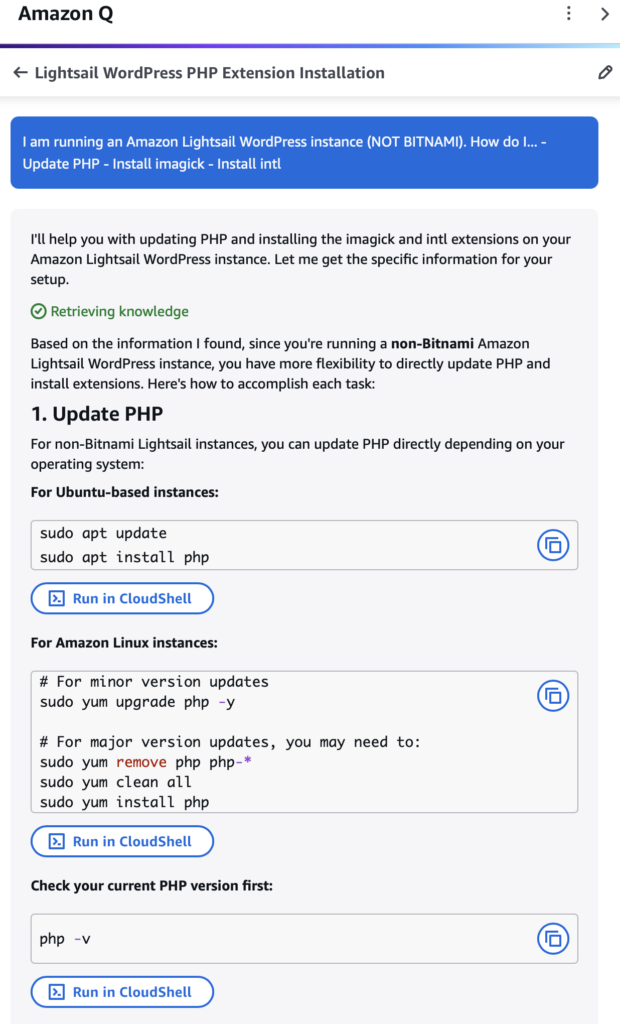
Recently I converted a Bitnami WordPress instance on Lightsail to use AWS native WordPress instances. One of the things Amazon left out on their migration documentation is migrating over an SSL certificate to the new instance (that is what provides the secure site validation, the https on the secure site URL). When I asked the AWS-trained AI Assistant known as “Amazon Q” about how to setup the SSL certificate things got crazy. I told it all of the details in my prompt – I recently setup an AWS Lightsail WordPress instance that replace a legacy Bitnami instance. I told it the Lightsail instance ID, the domain name, the Static IP resource, the IPV4 and IPV6 addresses, and general information about the domain, DNS records, and a lot of other details that painted a complete picture of the installation.
Amazon Q provided a quick response on how to get my secure site status back. It presented a stack of about 20 steps to perform including a lot of steps that were completely unnecessary. I told the AI agent about the environment, yet it gave generic steps on setting up the DNS (already told it that was done), registering a domain, getting an AWS SSL certificate, and about 15 other steps that if it truly processed the input prompt and had any real-world understanding of how things worked it would have skipped most of it. If I provided the same email or text message to a junior or intern network engineer or sophomore infotech student even, they should have skipped 90% of the crap Amazon Q was telling me to do. The best part – the entire instruction set was based on BITNAMI, the instance type I explicitly said I replaced with a Lightsail instance. Why? Because the AI had been trained with 95% of its Lightsail SSL certificate resourcing having been based on the prior history of Bitnami being the only option for WordPress on Lightsail.
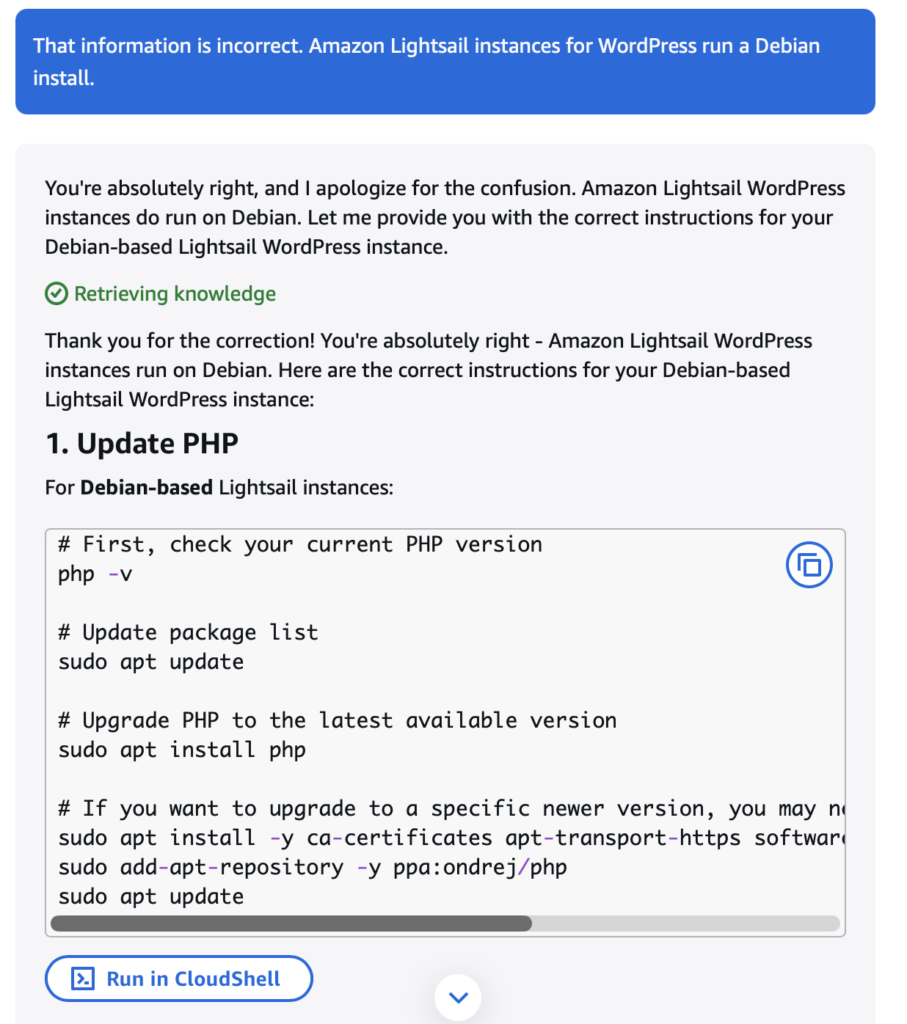
When I told it “those instructions are for Bitnami instance, I am using the Amazon Lightsail WordPress instance”, Amazon Q apologized for the error, re-evaluated its response, the stripped out all the Bitnami references, stripped out half of the steps, then presented me with a new Amazon specific answer. The problem is, that answer was just a modified version of the Bitnami answer retooled for AWS Linux over the Bitnami flavor. Even more problematic is if I took those steps it would have created system-level shims that would take the OS and web stack out “standard supported configurations” and made it a “custom, you patch your own stuff” mode from this point forward. In other words any one-click “upgrade” or “patch” options would forever be off limits for this instance. It was a horrible option with a lot of extra work.
In the end I resorted to old-fashioned web search from within the Lightsail documentation. Thankfully AWS has updated their Lightsail documentation to account for their planned deprecation of Bitnami instances. I found a quick 5-step web-interface based option to attach my pre-existing SSL certificate for the lancecleveland.com domain and hook it up to the new WordPress Lightsail instance. It took 5 minutes having run its own Let’s Encrypt installation. Best of all it maintained the “supported stack” status allow for future one-click OS and Web App security patches and upgrades.
Did the AI Agent create a viable output after I told it the first attempt was wrong?
Sure did.
If I was naive about what it was doing, would I have come to the conclusion that “AI is awesome, it fixed my problem!”. Definitely.
Thankfully I am not clueless, at least not with this task. I saw the flaws in the execution strategy and looked for a better, and in this case more appropriate, solution. As such I kept my application stack simple, uncluttered, and following what AWS would considered best practices.
If I had followed the AI instructions I would have had a solution at the cost of screwing my future self and adding a ton more work every single time I needed to upgrade this system.
AI Is Inefficient
Some might argue that the reason the number of lines of code being committed on GitHub every month has increased 10x due to the AI being better at creating code. It is more efficient. It is faster.
While that might be true in some cases, I pose another reason – AI writes a boat load of inefficient poorly written algorithms as they flail about. They are a giant probability engine that is much like a room full of 100 monkeys writing a novel. The reason they come up with a version of Shakespeare more often than the room full of monkey is there are 100 million monkeys all jacked up on speed and operating at a million miles per minute. Eventually they spit out something that we find marginally useful.
Personally I do not feel as though “AI has solved the coding challenge” as many AI podcasts and articles claim. Yes it can code for results. However it is not a quality coder. It creates inefficient code the burns resources. While compute cycles and memory are cheap these days, that is a poor excuse of being poor stewards of our natural resources. Inefficient code burns very real resources. It consumes 2x – 10x more energy which in turn requires that much more water to cool those CPUs turning all those extra compute cycles.
AI can do better. We must insist it do better. Fellow technologists need to continue to push for better training of models using better code design. It impacts much more than the bottom line.
Image by Gerd Altmann from Pixabay
One thought on “AI Is Not A Great Coder”