
How Good Is Codex GPT-5.5 At Writing A Web App? Part 1.
Part 1. Milestone 0
I have spent a lot of time over the past two years using AI agents to help maintain and update a 10-year-old legacy SaaS application. The process yielded mixed results. Sometime the AI agents would surprise me and generate useful results with minimal need for human intervention. Sometimes those positive results would even save hours of time over the old-school human processing. Most of the time the AI wasted my time, yielded subpar results, often made things worse instead of better and almost-always required extensive back-and-forth interactions.
Overall my 2 years of working with AI on a legacy application with significant inherited technical debt was not a positive experience. Always upgrading to the latest models did not improve the results. Employing models that were “better trained” for coding and code architecture tasks did not help. Building extensive MCP, ACP, and RAG systems did not improve the throughput. Yes the newer models did things faster. Sadly it was usually creating the same subpar code and making the same basic mistakes but taking less time to do it.
AI as a replacement application architect and code developer is mostly a myth. At least for an independent developer or small code shop that does not have $100,000 and a few hundred hours to spend crafting the “best of bred” AI agent context stacks. At least not if you care about quality of code and ability to maintain that code in the future.
After two years of mostly fighting AI to get the right results, I decided it was time to try something new.
The Travel App
This month I decided to create a new application completely from scratch – my thoughtfully named “Travel App”. This is a web app idea I’ve thought about for a few years. As an avid traveller I have built a fairly robust data-centric app in Google Sheets to manage travel. It is especially useful for complex itineraries or when traveling with a group of people. It helps ensure things like transportation, accommodations, and events planned during the trip all align. It helps keep track of confirmation numbers, arrival and departure dates, and primary expenses. It also helps sort out cost sharing with a group including “my treat” situations or “split this between 3 of the 5 people in the group” scenarios.
I decided this would be the perfect test case to see what the latest cutting-edge Agentic AI platforms can do.
Since Anthropic has been a bitch lately and for some reasons has deemed my email as a potential “AI Hacker” and because I already use OpenAI technology on a regular basis I opted to attempt this project using the latest Codex GPT-5.5 as the go-to model for most of the work. On occasion for less critical operations like “review this documentation” tasks I employ the GPT-5.4 mini model, but for the most part GPT-5.5 is the workhorse. The go-to level of reasoning is set to the medium level.
I’ve also opted to connect to Codex using an API key. While this tends to be more costly than using Oauth connections to a Business Plus or Pro account, it comes with the benefit of not having an unknown arbitrary token limit kick in during processing (ChatGPT Business claims to be unlimited, but it is not really, there is a 5-day and 1-week token burn rate limitation). It also let’s me track AI cost at a granular level.
Now to see exactly how good is Codex GPT-5.5 at writing a web app? Let’s find out.
This article is primary my running notes of the experience with commentary as appropriate.
Initial Interactions With Codex GPT-5.5
I started with a clean slate using a new code repository cloned into an empty travel app directory on my laptop. I configured a new Webstorm project and added a couple of basic files to get started. The starting files included a copy of the Google Sheet in xlsx format, a screenshot of the main interface on the Google sheet, as well a a text copy of the prompt I would use to kick things off:
I am looking to create a new SaaS application for travel planning.

DO NOT EXECUTE a plan and start building the application at th is time.

We need to start by planning.   Review the README which explains the outline.   The attached Excel sheet is a rough outline example of the functionality for this app that uses an Excel template I have used for years.  I copy this sheet within my "Trips" folder on Google with each Google Sheets representing a new trip.

The attached PNG is a screen shot of that spreadsheet as  a "quick and dirty" outline reference for this project.

Before setting a plan, I want to provide a solid architecture outline for the tech stack.

I am fairly platform and tech stack agnostic.   I do have extensive experience in JavaScript, TypeScript, some React and Vue experience, extensive PHP and Perl experience, but know many coding languages.  I am also very familiar with AWS cloud platform technologies and have employed ECS and RDS on several projects.   I am well versed in SQL databases such as MySQL and PostgreSQL with a preference for PostgreSQL when given an option.  I am aware of NoSQL options as well but am less familiar with them.   I have also deployed various lambda applications and have played with Amplify web apps in the past.

I am open to learning new stacks including different programming languages, persistent data stores, and frameworks based on input and analysis of the goals of this project.

I want a modern UX with multi-user capabilities "out of the gate".

Let's plan our app so we can start building at a later time from a solid foundation.

Please feel free to add any notes or documentation to the existing ./documentation folder.

Keep in mind you are running with the Webstorm IDE from Jetbrains.  We are communicating via the AI Assistant submodule in Webstorm.  You should leverage built-in JetBrains exposed tools over native operating system (MacOS) tools when appropriate.     Query JetBrains for meta about where to keep persistent notes that spans our session contexts here.    We will most likely need an AGENTS.md file along with some supporting documents that future AI Agents can read.    The better we can be about creating long term AI-centric knowledge throughout this project the better our results will be.

Let's get started.

Review these documents and suggest our tech stack and framework for this application.     We can then start a question-and-answers phase to further refine your knowledge about what we are trying to build. Lastly we will work from our 0.X.Y versions of the appliation toward a 1.0.0 beta release that I will publish on AWS for friends-and-family to use.
After processing this prompt, Codex asked follow up questions and created multiple directories with markdown files. Some files explained the AI understanding of the project, others were an inventory of technical assets, and others were planning documents including questions I needed to answer to provide clarity on the project specifications.
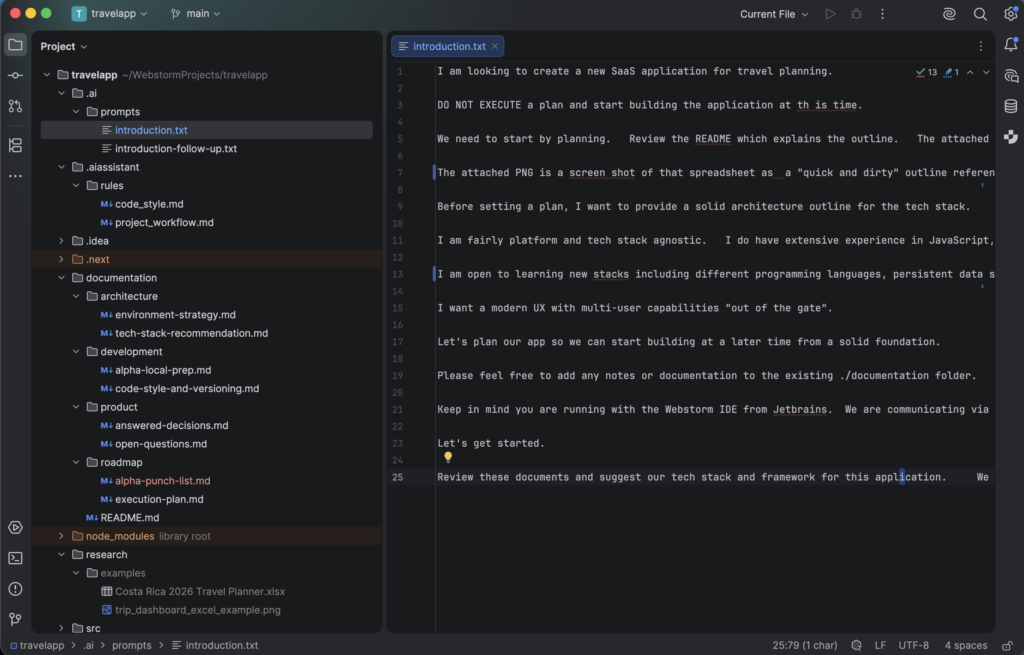
After a few days of back-and-forth questions where I would provide answers via prompts or via updated markdown files we had an initial plan to start working toward an alpha release of the “Travel App”. We had our software development lifecycle (SDLC) rules in place, our information technology (IT) stack centered around AWS defined, things like general code style and continuous integration and development (CI/CD) processing defined. We also included answers to basic functional and user experience elements of the application itself outlined in these starting documents.
All told we ended up with around a dozen human-edited-Codex-5.5-generated documents in our project. I reviewed them for consistency an accuracy, editing as needed, but mostly left the documentation as untouched as possible. The concept behind this effort is to see what AI can and will do when left to its own devices with a “greenfield project” managed and defined primarily by AI. My input was to guide it to use services I am familiar with so I can quickly ascertain the validity and effectiveness of the decisions AI makes along the way.
Overall the documentation that was generated is fairly decent. Not nearly as deep as I would normally do when leading a major project like this , but a solid start. Since this particular project is not running against a real-world business need the starting point is good enough.
Now that we have the outline of what we want to create and what the processes are that should guide it, let’s get started. After ensure some basic tooling is in place , for example already having Docker on the laptop and some basic dev commands available like git access, a GitHub account , an AWS account, and related tools, it was time to let AI start working toward the initial milestone.
Getting this far took a few days of on-and-off effort. Total time spent was round 3-4 hours of my time, less than 1/10th that in AI processing time. The API token cost for this interaction and to create the dozen supporting files was just under $3.00 and around 4M tokens.
GPT5.5 Defined Tech Stack
After considering my areas of expertise, which loosely defined some of the online services as well as tech components I am familiar with, Codex GPT 5.5 crafted a recommended tech stack. Here is what it came up with:
Use a TypeScript-first SaaS architecture built around Next.js, PostgreSQL, AWS managed services, and infrastructure as code.

Recommended baseline:

Web framework: Next.js App Router, React, TypeScript

UI layer: Tailwind CSS plus a headless component system such as Radix UI or React Aria Components

Data grid: TanStack Table with a custom day-planner presentation layer

API shape: Next.js server actions/route handlers for first-party UI, with a versioned internal service layer that can later expose REST or GraphQL

Database: PostgreSQL on Amazon RDS or Aurora PostgreSQL Serverless v2

ORM/migrations: Prisma ORM initially

Auth: Amazon Cognito User Pools with Google, Apple, and Facebook federation
Authorization: application-level role checks backed by PostgreSQL membership tables

Infra: AWS CDK in TypeScript

Local runtime: Docker Compose on the user's M-series MacBook Pro

Hosting: Dockerized Next.js app on ECS Fargate behind
ALB/CloudFront; App Runner remains a fallback
Files/attachments: S3 for encrypted attachments, future exports, and itinerary documents

Payments: Stripe Billing for annual plans, trial periods, renewals, and webhooks

Observability: CloudWatch initially, with OpenTelemetry/Sentry later if user-facing diagnostics become important

This path fits the founder's experience, minimizes language/context switching, preserves AWS optionality, supports local Docker development, and supports a clean path from alpha production to a friends-and-family beta.
Milestone 0: Project Scaffold And Local Runtime
It was time to get started with developing this web app.
My prompt to kick things off:
Ok - let's begin executing this plan.
Go ahead and create a "punch list" for anything I need to setup or provide to get this project started.   Otherwise, begin development of the architecture and codebase for this project.   Ask for input or help as needed.
The Codex GPT5.5 agent started producing assets. This is how it went.
Codex started by using a standard node library command to create the initial app workspace:
npm create next-app@latest travelapp-next-scaffold
    -- --typescript --eslint --tailwind --app
    --src-dir --import-alias "@/*"
    --use-npm --yes
Codex then went on to creating a rudimentary Next.js application scaffolding:
I’m going to implement Milestone 0 now: project metadata, Next app shell, Tailwind styling, health route, Docker Compose/PostgreSQL baseline, a preflight tool, and a punch-list document. I’ll keep real auth/database behavior behind the next milestone rather than faking Cognito or Prisma prematurely.
At this stage Codex GPT5.5 put together the files necessary to setup and run a Docker container for the application. In doing so it had a couple of incorrect steps with delineating local development versus deployment configurations. After some self-inspection and validation cycles, ChatGPT 5.5 Codex corrected the issues and extended the initial environment (.env) configuration file. This was necessary to ensure one codebase and supporting system files can be used for the development (local laptop) as well as the staging/production (AWS cloud based deployments) can run without modification to the core files themselves.
Good catch GPT 5.5.
Not sure why the design wasn’t correct from the implementation as Codex GPT5.5 wrote the entire implementation, SDLC, and cloud deployment documentation. Those documents made it clear about a single codebase and different running environments for the application, so you’d think the initial design and implementation wouldn’t have needed to go through this “design, test, fail, redesign” stage even if automated. You’d think an intelligent frontier AI Agent like Codex GPT5.5 would be able to get this right the first time, not after a “review my own work” cycle, but at least it caught the problem before deployment.
Next issue, after catching its own brittle deployment construct, came up on the second self-review pass. Now that it fixed the brittle deployment it ran another self check. Codex GPT 5.5 found its own Docker configuration error that was exposing secret data in the Docker startup sequence. The method Codex created to pass private environment file settings, where things like passwords or private API keys might live, would publish those private pieces of information in potentially public system logs.
Again, good catch, but “keeping secrets a secret” is another key element Codex GPT-5.5 had listed in the original manifesto. Why it doesn’t have the intelligence to know that “inlining” an entire file full of secrets is a security risk upfront is questionable. That is rudimentary security principles being ignored. Yes, it caught it, but why is it not getting it right the first time?
Internal dialogue while writing this:
After watching a documentary about the evolution of AI at Google about Demmis Hassabis and the work at DeepMind that many credit as being the catalyst behind AGI, I think I can answer this "why is it not right the first time?" question.     The engineers behind AI are still approaching AI operations from the recursive feedback loop mechanism used for training AI.    The basic principle is assign positive values to good outcomes, code the learning system to seek out maximum point accumulation, then let the system flail about to stumble into workable solutions.   When a stumble down a path generates more points, give those decisions more weight.  Repeat failure until success exceeds a defined "you figured it out" threshold, such as score at least 95 points.     Sadly that means a lot of wrong answers, burning CPU cycles and natural resources until eventually it has closed enough doors on the "don't do that" path that the only doors left open yield a viable solution.   Sadly it is also rarely the 100 point perfect solution, but above the 95 point threshold to be acceptable.    As such, even the latest frontier model like Codex GPT5.5 will still guess at the best path, fail, and retry.    A bit more sophisticated than random stumbling along, but there is still a lot of room for improvement.
After fixing the basic Docker container configuration issues the initial container to run an app was ready. Next up Codex GPT-5.5 needed to create the PostgreSQL persistent data store. Yet again, the stumble, fail, retry, success path is taken. Codex has yet to get something right the first time, but again corrects its own mistakes. It mounted the PostgreSQL persistent volume on the wrong path.
The data volume should mount at /var/lib/postgresql, not /var/lib/postgresql/data. I’m fixing the Compose volume path and then I’ll restart the generated local containers.
Now that the data store is in place and the container for the app is in place, Codex GPT-5.5 started writing the initial code for the application. It crafted some code including a REST API endpoint to test system health. Cool feature to have, not discussed, but a useful item to have in the application toolkit. This was a good design feature to add, and it was done without any guidance on my part. Good job Codex!
But…
Codex broke its own implementation. It coded the endpoint then tried to test it with a basic curl (web page fetcher app) operation that yielded a 500 error (fatal error – the app crashed). Turns out it was some leftover artifacts from previous stumble, fail, rewrite attempts. As any system architect or full stack engineer will tell you, failed application runs often leave behind some “cruft” and more often than not that cruft pollutes future work. You must always clean the cruft out. Besides the waste of resources in the “try this, fail, try that” design pattern, this is another negative outcome from this approach that is inherent in AI systems.
Codex, once again, figured out the error in its approach. It caught the error and noted it was due to prior work that left behind rogue artifacts. It cleaned those up but was too aggressive. This yielded yet another failure. Now the coded app was failing due to a component that went missing for the Turbopack module. Again Codex caught the new self-inflicted error and resolved the problem.
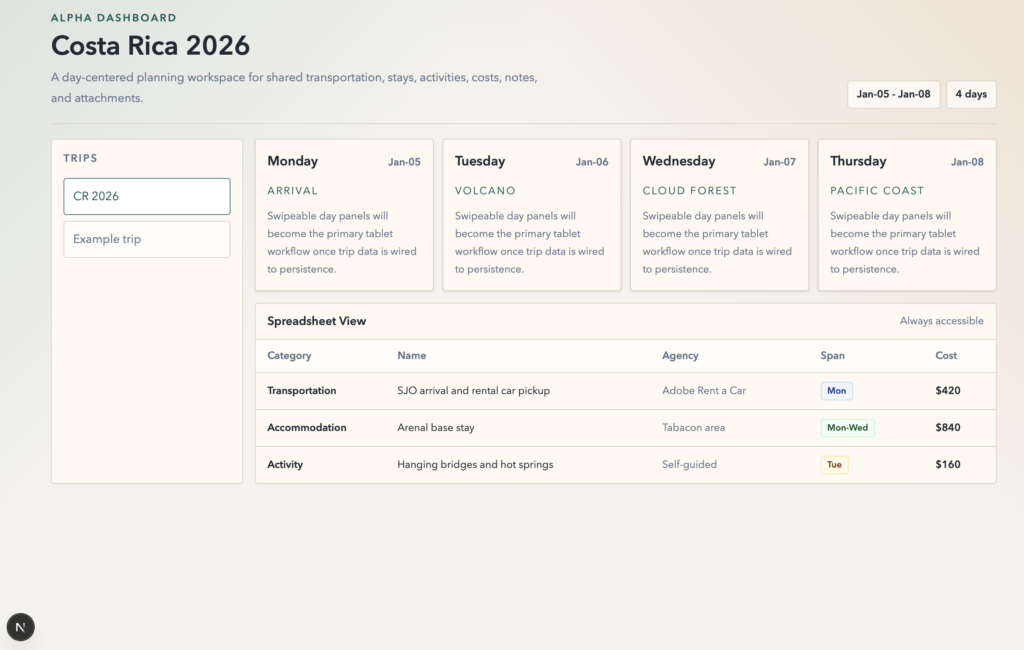
After a number of try, fail, fix, try attempts, Codex GPT 5.5 finally had an initial application scaffolding in place running on the local Docker container.
Part 1 Scorecard
So how do I feel about the initial work Codex GPT 5.5 did in the first phase of our journey to create a functional web app?
I’d have to give it a “B-” grade at this stage.
The original documentation that was mostly created by Codex was fairly extensive. It was nowhere near as complete as the documentation I would gather while doing a full business audit and technical review, but it is fairly solid given the loose requirements that were given in the initial prompt. It was more detailed than I expected and was fairly thorough. Good enough to provide a lot of guidance in how to build the application and with which tools.
Despite numerous failures along the way, the Codex GPT 5.5 AI Agent did work in a mostly agentic fashion running in well defined stages. Small steps of “try this first stage” , test it, fix it. The steps made sense as well. It did not try to go too far down the deployment tree before testing. Instead it sets up the workspace, tests. Sets up the first Docker container for the app, tests. Setup the database container and test. And so on. Very logical breakpoints.
Sadly the AI did end up creating things that filed nearly every time. I think it only did one minor task and get it right the first time without having to do a test, analyze, rewrite. That uses up a lot of extra resources.
The one BIG issue with the results, and one that might even warrant a “C” rating… after all the self-created notes about keeping secrets a secret the Docker compose.yaml file, which will be stored in a git repository, contains the database name, username, and PASSWORD in the yaml file itself. Not good. Especially after flagging similar violations in a self-review earlier in the process.
You’re right to flag it. Local-only defaults are common in examples, but committing an actual database username/password in compose.yaml is the wrong direction for this project.
As for the cost of this AI centric approach to this stage – 9 million tokens at a little less than $7. That is much less than it would cost to outsource this, but we really only got about 30 minutes of work from the AI Agent and have a very rudimentary starting application setup.