
PHP Security, AWS Lightsail, and WordPress
If you have anything to do with websites, something related to technology, deal with WordPress in any way, or even happen to have some technical info feeding into your news streams, you probably have heard about the PHP security issue. Since PHP is the primary engine behind WordPress and WordPress powers well over 50% of all websites, there are something like a HALF A BILLION websites that very likely have a security vulnerability that needs to be patched ASAP.
The general story goes something like “AI security researcher finds a bug deep down in the PHP code. The news was published a bit prematurely about how to exploit the bug. Many hackers, now with AI-enabled tools have the combination to leverage the exploit. If you are running a site with older versions of PHP… as in OLDER THAN TODAY, you need to be concerned.”
How bad is it?
The NSA, NCSC, and FBI have all encouraged immediate patching or shutting down servers.
From the Google Gemini summary today:
The critical PHP vulnerabilities—dubbed PHP2Shell and tracked as CVE-2026-109618 and CVE-2026-109619—are among the most severe flaws in software history. Rated 9.2 out of 10 (critical), they allow unauthenticated attackers to execute remote code or steal sensitive server memory, leading global agencies like the NSA and NCSC to urge immediate patching or offline shutdowns.
If you are running PHP on a website you need to upgrade to one of these versions immediately:
- PHP 8.5.12
- PHP 8.4.27
- PHP 8.3.36
- PHP 8.2.35
The official PHP security advisory can be found here.
Personally I recommend upgrading to PHP 8.3 or higher. Sadly many online hosting companies have yet to provide officially supported packages above 8.2.
One such company is Amazon and their AWS services. If you are running any of their pre-packaged OS configurations on Lightsail, EC2 or other platforms you very likely will need to do a forced PHP update. Even with the forced update most services including the newest Lightsail WordPress packages provided by AWS run older non-supported PHP 8.2 variants, but at least you can still get the critical security patch needed to address today’s PHP2Shell critical vulnerability.
Do Not Trust AI For Patches
During the past 24 hours I’ve been busy updating servers, patching PHP primarily, to address this vulnerability. Sadly, too many online AI assistants are woefully outdated and those that are not suck at systems management and security issues. DO NOT trust what the AI chat bots are telling you. While some will give you correct advice, this is NOT something you can trust to a “solid AI guess”. We all know AI still hallucinates and just plain “makes shit up” so it can pretend to be smarter than it is. For security these guesses can leave your system exposed while you go along thinking you’ve addressed the issue. DON’T DO THAT.
If you follow the instructions of your AI chat bot on patching your PHP versions, please perform the due diligence and at least make sure the new version is what is running. Keep in mind that many servers can run different versions of PHP for different modes of access. That means the command line version may NOT be what your web server is exposing to the world. Make sure you check your PHP version from within a hosted application as well as on the command line. For those using WordPress look under Tools | Site Health | Info to see the actual in-memory version of PHP that is being used. Make sure it is on the list above (or newer).
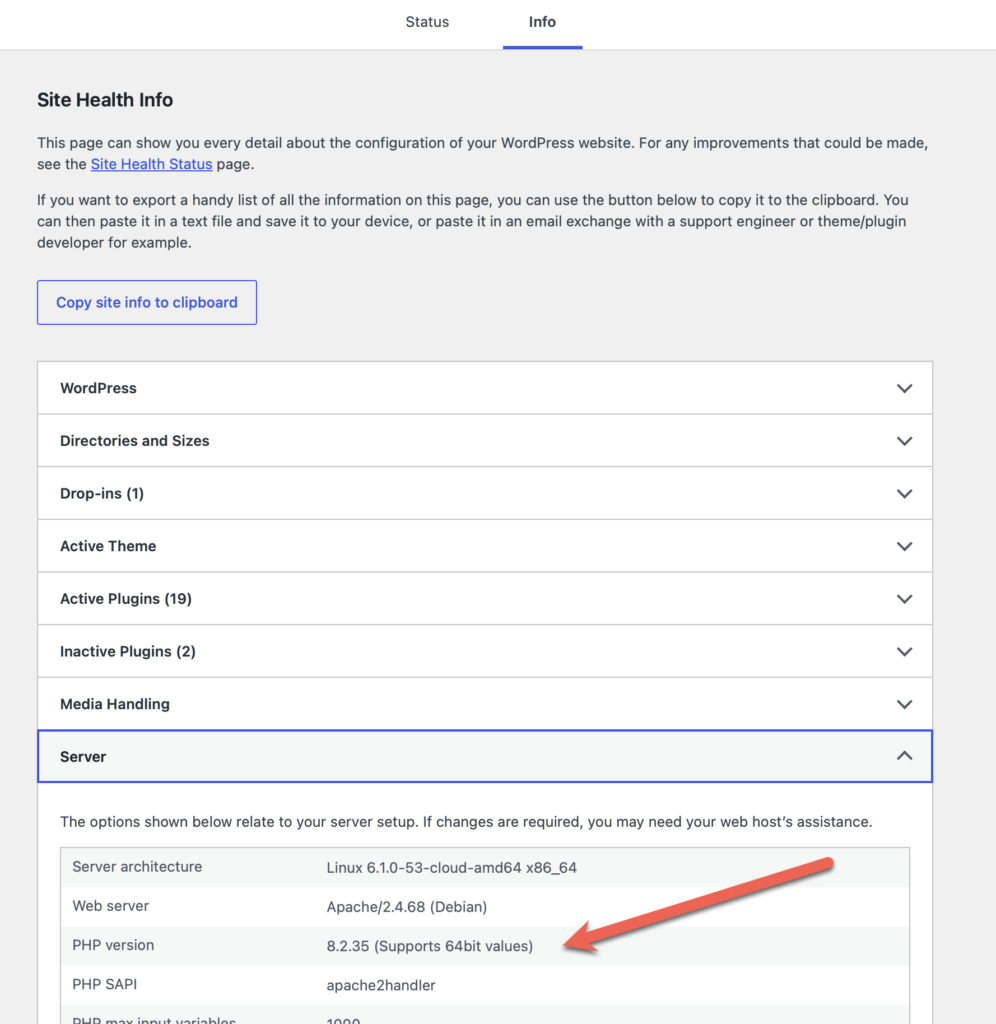
In my setup, I started out asking “Q” on Amazon (their AI “tech support helper) about upgrading some WordPress Lightsail instances. The information was not even CLOSE to correct. One of the main problems is the training data for Q only goes through 2025. That means it doesn’t know anything about PHP from the past few days. The second problem is it is easily confused and provides instructions for AL2003 releases of Linux when Lightsail runs Debian releases. The means the update instructions are incorrect.
Updating A WordPress Lightsail Instance
First make sure you are using the AWS Lightsail version of WordPress, NOT the Bitnami version.
Access your shell command line interface.
sudo apt update
sudo apt-get install --only-upgrade php8.2*
sudo update-alternatives --set php /usr/bin/php8.2
sudo reboot
Image by Mayur Gadge from Pixabay