
Improve Your AI Assisted Coding With AGENTS.md
If you work in software engineering you’ve certainly heard about things like “vibe coding”. You’ve probably read about how many companies are now having AI bots writing a majority of their deployed code. If you are not employed by a large corporation you probably spend a lot more time using artificial intelligence as an assistant more than a self-deployed agent that builds full production code. Software engineers working in the gig economy or that work for themselves or a smaller “mom and pop” type shop are more likely to employ AI assisted coding. From my own admittedly limited research, applications built with AI assistance versus full AI control are higher quality and far more performant. While I could cite many examples and do the deep dive on how AI is often misguided and hides fragility behind error traps, that is not what this article is about. This article is for how to make your AI assisted coding more efficient at producing quality results. The “secret sauce” is deploying an AGENTS.md file.
What Is AGENTS.md?
AGENTS.md is a typical markdown file that has become a de-facto standard for AI assistants. It is most often utilized by software development tools and environments to guide AI assisted development. The AGENTs.md file is often one of the first files that is searched for and loaded by AI prompt interfaces when working from a coding environment.
The AGENTS.md file is essentially a rule book for AI agents to follow as they interact with the code and deployment systems in a software development lifecycle. It often includes things like hints about code repository structures, conventions for a project related to style and procedures, provides hints on what tools are available and how to invoke them, and guides the AI to follow the same workflow as the old-school biological coders that are on the team.
Most modern software development lifecycle tools support AGENTS.md processing with no additional configuration required. You’ll find it in IDEs like PhpStorm, Webstorm, and Cursor. You’ll find it in assistant tools like GitHub Copilot or Factory Droid. The reciprocal tooling is present in nearly all newer LLMs like OpenAI Codex, Claude Code, and a host of others. In other words it may not be a true standard, but the AI coding community has certainly treated it like one. You’ll even find that many IDEs now support a general “apply to all AI services” AGENTS.md file as well as service-specific rules that only apply to Claude (CLAUDE.md) or GEMINI.MD, though those are already becoming legacy implementations. (thought bubble: Can you have legacy anything in year-old tech?)
AGENTS.md content
The AGENTS.md markdown file can be used to provide hints about the architecture of a project or module in a software project. It can set boundaries like “never change this” or “use TypeScript versus JavaScript”. Some generic rules you may want to employ is to include things like “run npm test before committing code” or “always run yarn build after changing the React TypeScript modules”. You can also define the environment the agent is running in and the tooling available. More on that later.
Taking the time to set some general rules early can ensure the work the AI agent performs follows the best practices of the company, follows the architecture set within the project, validates its own work and tests the outcome before concluding the task chain. In general employing even a rudimentary AGENTS.md can significantly improve the output from AI interactions.
Performance Gains With AGENTS.md Tooling Hints
I mentioned earlier about providing environmental and tooling hints via the AGENTS.md file. One of the more useful early-stage hints in AGENTS.md is assisting with tooling. Time to do a deeper dive on this topic as it is one of the simplest ways to boost tool performance.
As it turns out many of the IDE and code assist tools out there don’t do a great job of communicating the technical environment and tools available to the AI agents. Sure some of that is due to many tools being project specific and not generic “across the board” rules. Many AI assistant interfaces don’t even provide basics like what OS is the command running on. Or the IDE the request is routed through and the tools it has available. Or hardware specifications indicating things like “we are on a Docker container with 1GB RAM” or “native hardware with 128GB unified memory”. These can provide important to how AI agents perform. Especially in an environment like an IDE where it is given permission to read and write files. This lack of “where you are going to perform your work” can make AI agents less efficient.
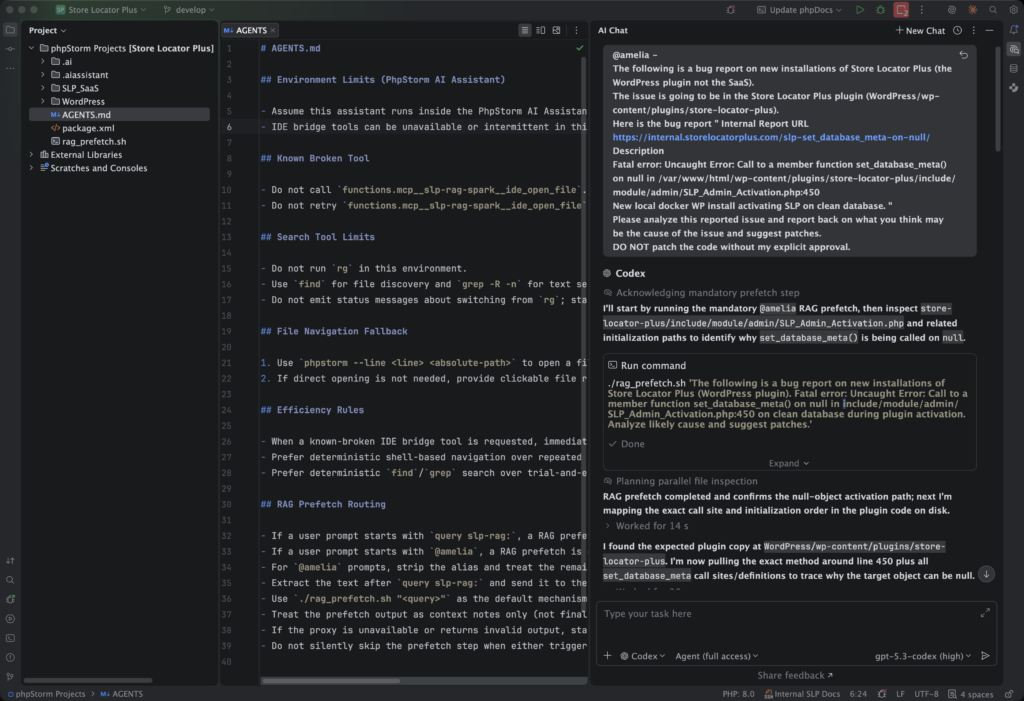
This is where I first learned the power of the AGENTS markdown file. PhpStorm has an AI Assistant that connects to multiple AI services to assist with revising a legacy (yes, it is well over a year old) app. One of the things I noticed when the gpt-5.3-codex model became available within the AI Assistant was that every time it had to search code for something it tried running multiple tools that didn’t exist in the PhpStorm environment. It did this EVERY SINGLE TIME burning 2 to 3 minutes of process time AI tokens. It was obvious the local context was not being updated automatically with a “that tool doesn’t exist here” rule, despite using the same prompt interface and backend service. I chalk that up to the tool tests being part of the contained-in-the-AI-brain “thinking cycle” that was not connecting to the agents context persistence layer. Surely there has to be a better way.
This is where the AGENTS markdown file comes into play. In my case I had both a secondary MCP server installed and configured in PhpStorm as well as a RAG service. The PhpStorm AI Assistant interface would communicate this to the agent, but it would not tell it anything about the tooling that was available. Turns out that the functionality an LLM is wrapped in is extremely important in any environment that is trying to manipulate files directly. For an IDE the most important functionality is the “tools” capability which defines how to perform I/O operations on the “other end” – in this case in the PhpStorm environment. Given the limited context provided by PhpStorm, the GPT coding brain was always trying to open files using command that do not exist locally in PhpStorm. Every request would try a modified stack of “open this file” commands until it landed on one that worked.
The initial AGENTS.md tooling to prevent that extra work was simple. These rules were added to the file , committed to the project code repository (we don’t want others on the team wasting AI tokens either) and things immediately improved. No command guessing, faster throughput. Here was my initial AGENTS.md file:
# AGENTS.md

- You are running in PhpStorm.
- This assistant runs in the AI Assistant plugin.
- Do not call functions.mcp__slp-rag-spark__ide_open_file
- Do not retry functions.mcp__slp-rag-spark__ide_open_file on failure
Those rules are specific to my custom environment where a RAG service and MCP service are running on the NVIDIA DGX Spark on the LAN. The general concept still applies to any project. If you see your AI Assistant running commands that are always failing, only to try something different, provide hints for EVERY interaction with an AGENTS.md file.
Evolving Your AGENTS.md File
After learning about the power of the AGENTS markdown file, I did a deeper dive. I researched how these files work and how others are employing this “standard”. One of the next thing I learned is that this file can, and should, be a living document. It should evolve over time based on not only what changes in your project architecture or tool set, but also in what the AI agents LEARN about your environment.
I quickly went from adding my own rules to having the same AI Assistant rewrite and update the rules in AGENTS.md so it becomes more efficient and knowledgeable about the project. Essentially allowing the AI to “remember” general operational rules or environmental constraints specific to the project. It is not a “know everything about the project” (a vector database driving a RAG service s better suited to that), but a solid operational framework and foundation on which to operate.
It is still early in the evolution process for my project, but the AGENTS.md file has evolved with the use of the AI Assistant itself. In PhpStorm gpt-5.3-codex no longer continues to try searching for content using the missing “rg” command; It learned that on its own and set the rules. It no longer fumbles finding the exact syntax to open a specific file on a specific line as the explicit command is in the AGENTS.md file. This allows the AI Assistant to open files just a few seconds faster on every interaction. It even provided a simpler way to tell the AI when to route prompts through the RAG service versus bypassing it to talk to the codex engine directly.
Here is the current state of the AGENTS.md file for my project:
## Search Tool Limits

- Do not run `rg` in this environment.
- Use `find` for file discovery and `grep -R -n` for text search by default.
- Do not emit status messages about switching from `rg`; start with `find`/`grep` immediately.

## File Navigation Fallback

1. Use `phpstorm --line <line> <absolute-path>` to open a file at a specific location.
2. If direct opening is not needed, provide clickable file references like `path/to/file.php:123`.

## Efficiency Rules

- When a known-broken IDE bridge tool is requested, immediately use the fallback path.
- Prefer deterministic shell-based navigation over repeated IDE bridge retries.
- Prefer deterministic `find`/`grep` search over trial-and-error tool probing.

## RAG Prefetch Routing

- If a user prompt starts with `query slp-rag:`, a RAG prefetch is mandatory before analysis.
- If a user prompt starts with `@amelia`, a RAG prefetch is mandatory before analysis.
- For `@amelia` prompts, strip the alias and treat the remaining text as the query string.
- Extract the text after `query slp-rag:` and send it to the OpenAI-compatible proxy at `http://**redacted**:8787/v1/chat/completions`.
- Use `./rag_prefetch.sh "<query>"` as the default mechanism for this prefetch.
- Treat the prefetch output as context notes only (not final user-facing answer), then continue normal local code analysis.
- If the proxy is unavailable or returns invalid output, state this clearly and continue with best-effort local analysis.
- Do not silently skip the prefetch step when either trigger is present.
Summary
The AGENTS.md file has had a marked impact on the AI assisted coding output for my work environment. Interactions are faster and the tooling is more precise. I can route queries that I know require deeper knowledge of the code history and R&D architecture documents through the RAG service by using a simple prompt prefix. The assistant is more consistent and provides better results every time. If you are not using the AGENTS markdown in your development environment, I encourage you to research it. Your AI assistant can probably start a solid start to the file for you.
For anyone using AI interfaces that do not support an AGENTS markdown file, there are other ways to do the same sort of thing. Nearly all AI enabled apps now have ways to pre-seed prompts without having to explicitly copy-and-base large blocks of instruction like the AGENTS.md file above. Tools like ChatGPT have Custom GPTS where you can pre-load similar prompt context (don’t be afraid of the name, it is non-techie and easy to do).
Taking the time to provide a good context foundation for your prompts, like those provided by the AGENTS.md file in a coding environment, can yield significantly better results from AI agents in any work environment.
Did I miss something? Have something to share? Hit the comments section and let me know!
About This Article
This article was 100% written by a non-AI entity. Please excuse the grammar, typos, and other imperfect elements.
Image by Ralf Ruppert from Pixabay