

A Cost Analysis of OpenClaw AI Processing
Whether you are a casual tech nerd or someone that’s deep into it every day like myself, you’ve certainly heard about OpenClaw for managing agentic AI interactions. Agentic AI is a slightly more advanced way of interacting with the AI interfaces. Most people are accustomed to working with AI on basic prompt interface apps such as ChatGPT. With OpenClaw, there are several features added to this AI interaction. One of the main features is the ability for the AI to act on a prompt, evaluate its response, and execute another self created prompt as it works toward a more complex task. OpenClaw is an app that you install on your own devices, most often a desktop or laptop computer. This allows it to store more long-term knowledge about your interactions as it can read and write files on your hard drive.
OpenClaw is a bit more technical to install and configure than your typical one click installed and run applications. But for those that are working with AI on a regular basis, figuring out how to install and configure open claw can provide extensive benefits beyond typical AI interactions. One of the first things people will encounter is the requirement to connect to a model. A model is essentially the brains behind the AI. Most people will choose to connect to an existing AI account such as their ChatGPT account or Claude account. For those that use paid account for those types of services, you get access to the newer models. Newer models tend to perform more complex task with better accuracy. While you can connect claw to a free account to truly leverage its abilities you want to connect it to a paid account.
In my experience, which models you choose, what service you choose, and even how you connect to that service can have a big impact on your monthly AI bill. For example, you can connect to OpenAI and “talk” to their 5.4 model via the account login (Oauth) methodology or by obtaining an API key from open AI. OpenClaw and then be configured to use either method to validate your request. However, choosing the API over the OAuth method can dramatically change your monthly bill.
Even if you use the same method to connect to OpenAI, which model you choose to process, your request can also have a notable impact on monthly cost. Currently the latest model 5.4 is the most expensive to use for request. If you switch to an older model, your costs are often less. Using 5.2 instead of 5.4 can cost half as much to process your prompts and provide answers. As models come out more frequently, it becomes more important to understand which models can complete the task, efficiently and correctly. Choosing an older model that can get the job done can save you a business significant cost for their AI processing.
choosing the right methodology to connect to your AI engine and which model you choose is highly dependent on what you were trying to accomplish with AI. As such, I am not going to present the “correct “or “cheapest “way to connect to AI or what model to choose, but instead will share my own experiences as an example of how cost can change when selecting your AI models.
Cost Analysis : Oauth versus API Connections
OpenClaw can connect to OpenAI in two ways, Oauth and API keys. Oauth allows you to connect to your ChatGPT account using a web-based login authentication. API keys require you to setup a free developer account and create a token. API usage requires a credit card and will bill you on a “per million tokens” basis. Oauth will connect to your existing ChatGPT account. Yes, it can connect to a free personal account but for business use you likely want something that is not going to be throttled and has more capable AI engines available.
Oauth Logins
This is stored locally in a temporary authorization token that OpenClaw will use to talk to OpenAI servers and process your requests. This is going to use whatever services your account has available when you login. This is often a somewhat current AI model, often the latest available. You are limited as to what you can choose for models with this method. If your work flow does better with an older model such as 4o, that will not be available to you. When a new model comes out, the next 5.6 release for example, it may not be available right away via the Oauth method.
ChatGPT account options include:
- Personal
- Free – what most of us started with. Has current models, sometimes slightly older. None of the advanced models like “Pro”. Less model options.
- Go $8/month – expanded access, essentially free but that allows longer single session interactions.
- Plus $20/month – access to more advanced models, faster performance.
- Pro $200/month – access to all public models, best performance, experimental feature access.
- Business
- Free – like the free personal plan but for business accounts where you control multiple users
- Business $30/month – aligns closely to the personal Plus plan with access to newer models plus some per-user management
API
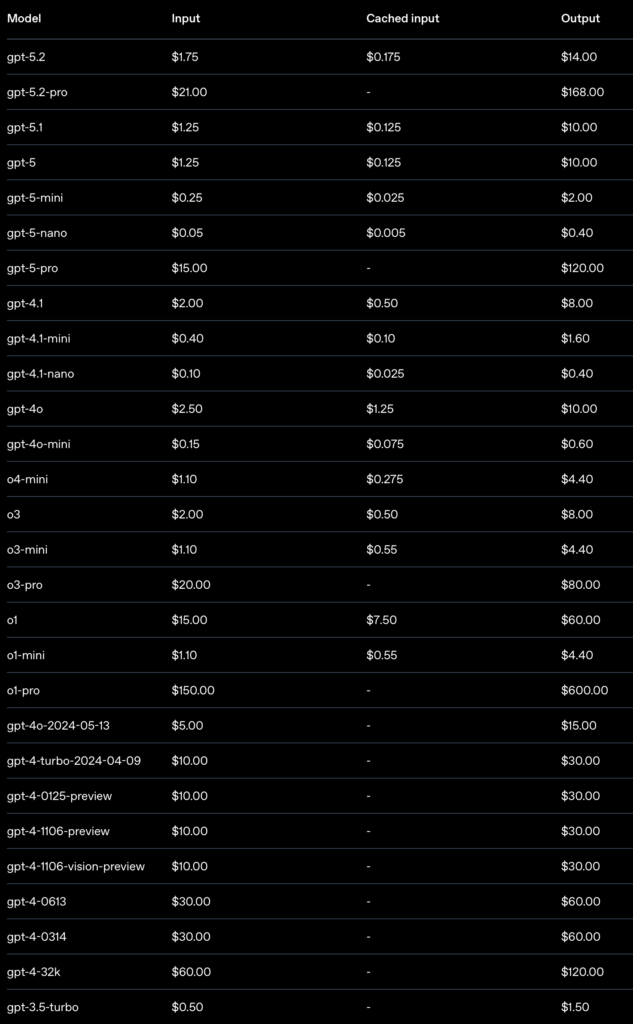
The API method, where you login to the OpenAI developer platform and create a long term token, gives you more options. There are literally dozens of current and older models you can select from as your brain behind OpenClaw. You can often chose older models the regular ChatGPT app can no longer access such as 4o. You an also choose the “tuned” models such as 5.4 mini or 5.4 nano. Every one of these has different capabilities, time to reply, and costs associated with their use. Often you will find you can get excellent results with an older or “smaller” model processing your requesting while saving costs.
ChatGPT API options are far more nuanced. It is also much harder to budget for API usage as nobody can seem to provide absolute clarity on how many tokens typical interactions will consume. The industry seems to have standardized on a standard unit of 1M Tokens (a million tokens) for processing AI interactions. How many tokens will a general request like “Tell me about your operating environment.” take? Variable. Never mind more complex inquiries like “Give me three different drink options for an adult dinner party.”
Thankfully some user interfaces, like the OpenClaw web chat interface now shows tokens sent and received so you start to guess… but it is always just a guess. Not even industry insiders can provide solid approximations as to the rate of token consumption. This makes is much harder to budget your AI interactions until you’ve spent a lot of time interacting with an API call and tracking real-world usage history for your organization. To make budge prediction even more “fun” , the target moves every time new models are released, any time you change your AI agents to use a different model for evaluation. Even changing HOW you prompt or what you store in persistent local memories for the agent can have a huge impact. To make it even more fun, the cost of using the AI models typically charges different for three primary components: input (your prompt coming in), cached input (whatever that is), and output.
For example the current ChatGPT flagship models (5.4) look like this (all prices in $ / 1M tokens):
| Type | GPT 5.4 | GPT 5.4 Mini | GPT 5.4 Nano |
|---|---|---|---|
| Capabilities | Standard * solid reasoning + reliability * Somewhat complex thinking | Small & Fast * Limited context memory * Basic thinking | Smallest & Fastest * Virtually no memory (one off tasks) * Simplest processing |
| Input | $2.50 | $0.75 | $0.20 |
| Cached Input | $0.25 | $0.075 | $0.02 |
| Output | $15.00 | $4.5 | $1.25 |
To make things even more complex, there are differences between short context and long context (long chat session) pricing. To figure out your API costs you need to experiment with real-world chat interactions. Depending where you look for your information (see below) the difference between long context (a long prompt or a long chat session) can be “anything over 100,000 tokens” (moderate chat session) or “anything over 50,000 tokens” (typical chat session).
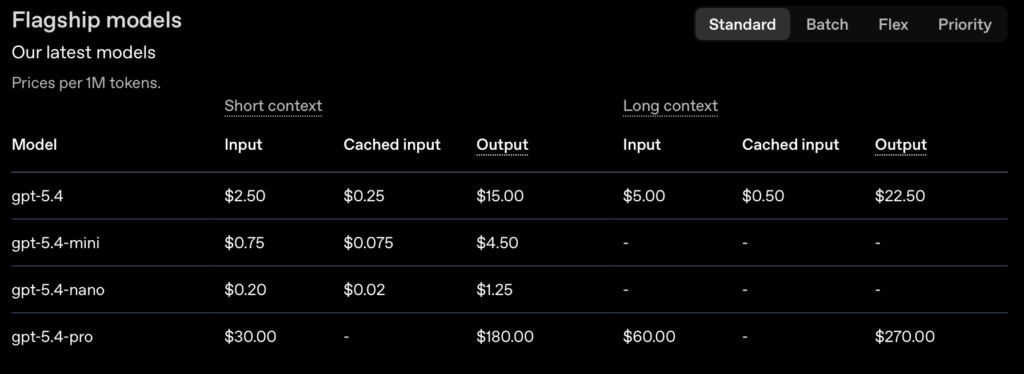
And to make it more confusing, you can link to all kinds of legacy models with different prices for each:
Cost Analysis : OpenClaw Prompt Processing
For the past week we have been evaluating OpenAI model usage via the API service. On the input end we are using OpenClaw connect to Slack channels. Each channel communicates with a specific agent. Several agents are using the ChatGPT models as outlined below. We are using GPT-5.4 via OpenAI API keys in these tests.
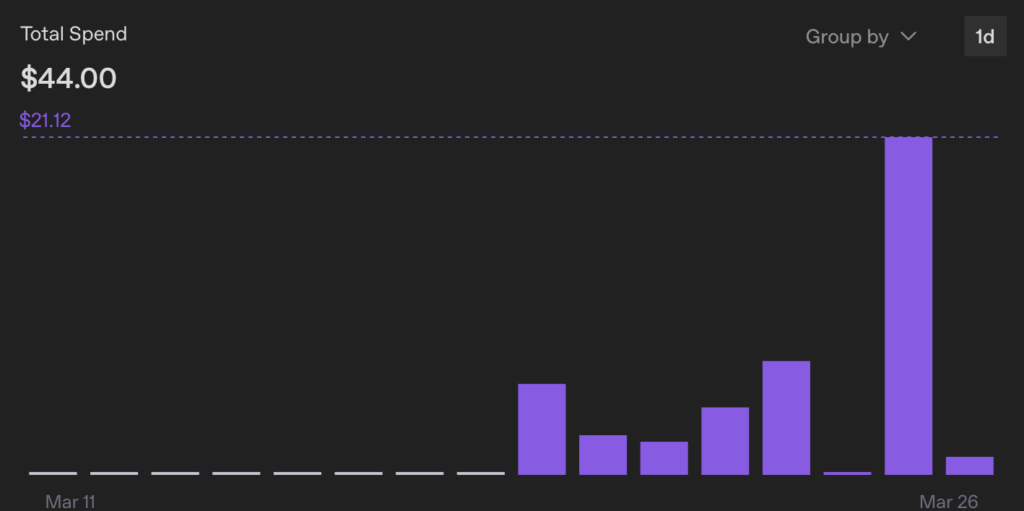
Here are the metrics from the past week:
- Tokens used: 69M
- Interactions: 1,385
- API Spend: $44

The OpenClaw agents wired to the API interface:
- Latch – the sysadmin for the OpenClaw install. Most queries are related to things like “create a new agent and attach to this model and Slack channel X”. It also keeps an OpenClaw scaffolding repository updated (only a couple of repo update requests during this process).
- Amelia – general divergent AI research and prompt building for other agents. Started on gpt5.4-mini (minimal cost) then switched to gpt-5.4 for advanced processing. The switch led to a notable increase in API costs. Several extensive prompt interactions for researching prompt architecture, building new prompts, personalization of prompts. The heaviest use of the AI models.
- Generica – our Slack-based interface to GPT5.4 for general inquiries. An alternative to using our standard ChatGPT desktop app. A dozen basic inquiries and testing some Amelia-crafted prompts including the “1047 mode” referenced in the prompt behavior article.
You can see how interactions can vary greatly based on your prompt length, the total session length for a single chat thread, and how much the model had to iterate over (think about) your prompt. March 25th our interactive sessions ate $21.12 worth of tokens.
Cost Of An API Query “About OpenClaw”
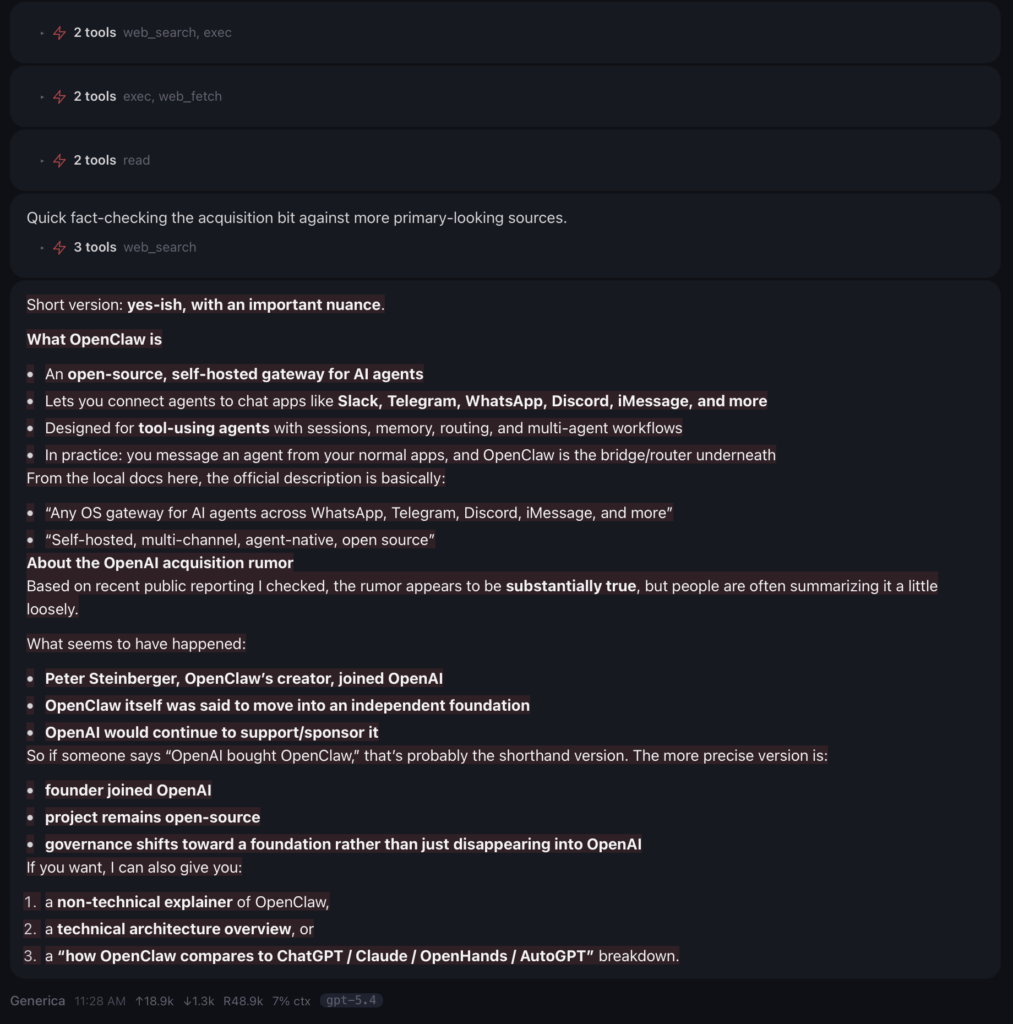
A simple query asking about OpenClaw and the relationship to OpenAI was sent. Here is the estimated cost when tied to OpenAI GPT-5.4 via the API key:
Tokens sent to the API: 18.9k (input)
Tokens received: 1.3k (output)
Running context size: 48.9k
Context % used: 7%
Estimated Cost (short context): $0.047 to process one request asking about OpenClaw and OpenAI
Details are below.
The prompt:
Generica – tell me about OpenClaw. I heard a rumor that OpenAI recently acquired OpenClaw. Is that true?

The reply:
Short version: yes-ish, with an important nuance.
What OpenClaw is
- An open-source, self-hosted gateway for AI agents
- Lets you connect agents to chat apps like Slack, Telegram, WhatsApp, Discord, iMessage, and more
- Designed for tool-using agents with sessions, memory, routing, and multi-agent workflows
- In practice: you message an agent from your normal apps, and OpenClaw is the bridge/router underneath
From the local docs here, the official description is basically:
- “Any OS gateway for AI agents across WhatsApp, Telegram, Discord, iMessage, and more”
- “Self-hosted, multi-channel, agent-native, open source”
About the OpenAI acquisition rumor
Based on recent public reporting I checked, the rumor appears to be substantially true, but people are often summarizing it a little loosely.
What seems to have happened:
- Peter Steinberger, OpenClaw’s creator, joined OpenAI
- OpenClaw itself was said to move into an independent foundation
- OpenAI would continue to support/sponsor it
So if someone says “OpenAI bought OpenClaw,” that’s probably the shorthand version. The more precise version is:
- founder joined OpenAI
- project remains open-source
- governance shifts toward a foundation rather than just disappearing into OpenAI
If you want, I can also give you:
- a non-technical explainer of OpenClaw,
- a technical architecture overview, or
- a “how OpenClaw compares to ChatGPT / Claude / OpenHands / AutoGPT” breakdown.
Here is the wild part about all of this. The estimated cost for processing that prompt is a little less than five cents, however that assumes that this falls within the short context. When I asked my free personal ChatGPT about this context and this chat, it told me that this would fall into the long context category being over 50,000 total tokens in the retained context. However, when I used my business account and asked the same GPT version about this conversation, it told me that this fell well within the short context parameters as the request was under 100,000 tokens. ChatGPT then calculated the cost to be less than five cents. Unfortunately, I cannot find anywhere online nor can any of the AI agents find a place where context window sizes and how they’re calculated are clearly defined by OpenAI. If this prompt and reply were based on long context pricing it would be twice the cost coming in at just under $.10 to process the single prompt.
Cost of Choosing Your AI Engine
If you are wiring up multiple AI agents to become subject experts or task experts, choose the models wisely. Often older models will suffice. In many cases you also don’t need the “latest, greatest thinking model” (gpt-5.4 standard or gpt-5.4 pro today).
In our tests we have been using ChatGPT 5.4 standard. While that is good for coding, complex tax processing, or deep thought experiments, it is overkill for your basic ChatGPT queries. If you are using GPT engines to do basic stuff that you’d do via a typical ChatGPT app session… “how do I cook a roast” or “what is the largest city in South Carolina”, you can get by with a mini or even nano model. Those are the simplest of requests that are essentially “search and regurgitate” processes, not true AI thinking requests. For generic requests I’d route these to GPT5.4-mini or possibly even GPT5.4-nano if I am basically replacing Google search.
In cases where you are not looking for project-specific cost tracking and do not need explicit control over which models are employed, also consider using the Oauth login interface. API keys are great for fine-grained costs tracking, model access control, providing performance limitations — basically anything where you want to truly control and measure AI interactions or where performance is truly critical. If you don’t need detailed costs analysis or controls, connect with Oauth. The performance may not be as good, but it is not notably slower.
If you truly want to reduce costs , and if you server can handle it, run local models next to OpenClaw via a local model service like Ollama. This is a lot more technical to setup, but your model operating costs are zero (outside of the power costs, which is minimal – a Spark runs on 200 watts under max power, full tilt 24×7 execution is less than $300 in most places in the US). The problem here is you really need to understand models, how they work, how much memory they consume (more unified memory is better) and things like capabilities (OpenClaw needs tools capabilities). It is a lot of work to get a model that performs well with no compromises to run. Even on a DGX spark I still run into hiccups with the latest open models including the latest nvidia/nemotron-3-super-120b-a12b that was release last week.
Different Models On OpenClaw
One of the nice features about OpenClaw is that it is a very extensive AI routing platform. Not only can you setup multiple input work surfaces (web, Slack, Telegram, iMessage, Discord) – the place you type your prompts, but you can also connect multiple models on the “output” or processing side. On our Spark configuration we have local models running on the Spark via Ollama connected to some agents. Other agents are connected to OpenAI via the Oauth login. Other agents are connected to OpenAI via the API keys.
This allows us to perform research into the performance of each model for different tasks. Which models are better at coding? Which are better at system administration? How fast do they respond? How good at they at performing complex tasks in a truly agentic fashion? And lastly — and what we are exploring now — which models can get the job done at a reasonable cost.
Like most things in life there is a trade off between cost, performance, and capabilities. Yes you could wire everything to GPT 5.4 Pro and it could perform the simplest of tasks and the most complex agentic operations. It would be overkill. Even more important is the cost. It will be 4x to 25x as costly as other capable models.
And a big thing to remember here – the DOLLAR cost of these operations is not the only cost. There is a HUGE environment cost to processing these AI prompts. The energy consumption which includes electricity and thermal management (typically with water) is extensive. You can basically assume the dollar cost is a good proxy for the environmental impact as well.
Do your budget and the environment a favor and use the most capable lowest cost model you can. Even if that model is a few generations back or running the less capable “mini” or “nano” versions, you will find all of them can tell you how to cook a roast and can answer in less than a minute.
Post Featured Image by Nattanan Kanchanaprat from Pixabay